Welcome to Season 16! Use Coupon SEASON16 for a discount off your next purchase! ↑↑↓↓←→←→BA

What to Do After Buying a LoL Account: Complete Setup Guide (2026)

Updated December 10, 2025
What to do after buying LoL account setup guide

Congratulations! You've just purchased a League of Legends account and you're ready to start playing ranked. But before you jump into your first game, there are critical steps you need to take to secure your account and set it up properly. This comprehensive guide walks you through everything you need to do after buying a LoL account, from immediate security steps to optimizing your account for ranked play.

Why Account Setup Matters

The First Hour Is Critical:

  • Most account recovery happens within the first 24 hours
  • Security changes prevent original owner from reclaiming
  • Proper setup ensures account longevity
  • Reduces risk of bans and issues

What Happens If You Skip Setup:

  • Account can be recovered by original owner
  • Higher risk of security breaches
  • Potential for account bans
  • Wasted money and time

The Good News: Following this guide takes only 15-30 minutes and dramatically reduces your risk. Let's get started.

Step 1: Receive and Verify Account Details (5 minutes)

Check Your Email

What to Look For:

  • Email from the seller with account details
  • Username and password
  • Any additional information (region, champions, etc.)
  • Check spam folder if you don't see it immediately

If You Don't Receive Email:

  • Wait 5-10 minutes (sometimes delayed)
  • Check spam/junk folder
  • Contact seller support immediately
  • Don't wait more than 30 minutes

Verify Account Information

What to Verify:

  • Username is correct
  • Password works
  • Region matches what you ordered
  • Account is level 30 (if that's what you bought)

How to Verify:

  • Try logging into the League client
  • Check account level and region
  • Verify any included features (Blue Essence, champions, etc.)

If Something's Wrong:

  • Contact seller immediately
  • Don't make any changes until issue is resolved
  • Take screenshots for evidence
  • Most reputable sellers fix issues within hours

Step 2: Change the Password Immediately (2 minutes)

Why This Is Critical

Security Reasons:

  • Seller still has original password
  • Prevents seller from accessing account
  • First line of defense against recovery
  • Makes account more secure

When to Do It:

  • Immediately after receiving account
  • Before playing any games
  • Within first 5 minutes if possible
  • Don't wait or delay

How to Change Password

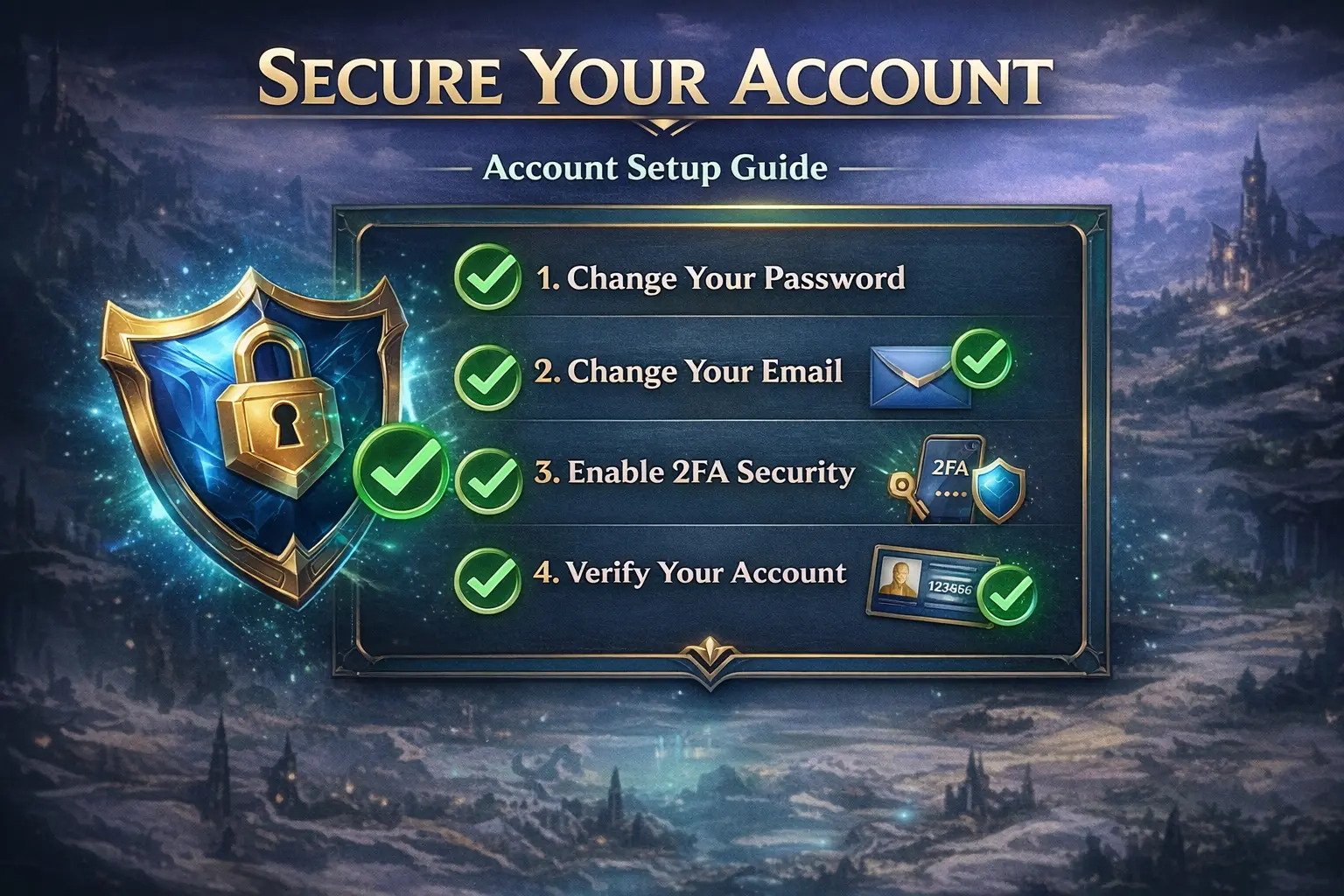
Step-by-Step: 1. Log into League of Legends client 2. Click on your profile icon (top right) 3. Select "Settings" or "Account" 4. Go to "Security" tab 5. Click "Change Password" 6. Enter current password 7. Enter new strong password 8. Confirm new password 9. Save changes

Password Requirements:

  • At least 8 characters (12+ recommended)
  • Mix of uppercase and lowercase letters
  • Include numbers
  • Include special characters (!@#$%^&*)
  • Don't reuse passwords from other accounts

Password Best Practices:

  • Use a unique password (not used anywhere else)
  • Consider using a password manager
  • Make it memorable but secure
  • Don't share it with anyone

Step 3: Change the Email Address (3 minutes)

Why This Is the Most Important Step

Prevents Account Recovery:

  • Original email owner can recover account
  • Email is primary recovery method
  • Changing email makes account truly yours
  • Critical for account security

When to Do It:

  • Immediately after changing password
  • Before playing any games
  • Within first 10 minutes if possible
  • Don't skip this step

How to Change Email

Step-by-Step: 1. Log into League of Legends client 2. Go to account settings 3. Navigate to "Email" section 4. Click "Change Email" 5. Enter your personal email address 6. Verify email address (check for typo) 7. Confirm change 8. Check your email for verification link 9. Click verification link to confirm

Email Requirements:

  • Use an email you control completely
  • Use a personal email (not shared)
  • Make sure email is active and accessible
  • Don't use temporary or disposable emails

Email Best Practices:

  • Use a dedicated email for gaming accounts
  • Ensure email is secure (strong password, 2FA)
  • Check email regularly
  • Keep email account active

If Email Change Is Not Available

Some Accounts:

  • May have email change restrictions
  • Might require additional verification
  • Could need seller assistance

What to Do:

  • Contact seller immediately
  • Ask about email changeability
  • Request account with changeable email
  • Consider requesting refund if not possible

Red Flag: If seller says email can't be changed, this is a major security risk. Consider this a red flag and contact support.

Step 4: Enable Two-Factor Authentication (2FA) (3 minutes)

Why 2FA Matters

Extra Security Layer:

  • Prevents unauthorized access
  • Protects against password breaches
  • Adds account security
  • Industry best practice

How It Works:

  • Requires password + code from app
  • Even if password is compromised, account is safe
  • Makes account significantly more secure

How to Enable 2FA

Step-by-Step: 1. Log into League of Legends account settings 2. Navigate to "Security" section 3. Find "Two-Factor Authentication" option 4. Choose authentication method:

  • Authenticator App (recommended): Use Google Authenticator, Authy, etc.
  • SMS (less secure): Receive codes via text
  • 5. Follow setup instructions 6. Scan QR code with authenticator app 7. Enter verification code 8. Save backup codes securely

Authenticator App Options:

  • Google Authenticator (free, reliable)
  • Authy (free, cloud backup)
  • Microsoft Authenticator (free, Microsoft ecosystem)
  • 1Password (paid, password manager integration)

Backup Codes:

  • Save backup codes in secure location
  • Don't store in same place as password
  • Use password manager or secure note
  • You'll need these if you lose your phone

If 2FA Is Not Available

Some Accounts:

  • May not have 2FA enabled by Riot
  • Might require account age/verification
  • Could be region-specific

What to Do:

  • Check Riot's 2FA requirements
  • Enable when available
  • Use strong password in meantime
  • Consider this when evaluating account security

Step 5: Update Security Questions (2 minutes)

Why Security Questions Matter

Account Recovery:

  • Used for account recovery
  • Can be used to reset password
  • Important security layer
  • Prevents unauthorized access

When to Update:

  • After changing email
  • Before playing games
  • Within first 15 minutes
  • Don't skip this step

How to Update Security Questions

Step-by-Step: 1. Log into account settings 2. Navigate to "Security" section 3. Find "Security Questions" option 4. Update all security questions 5. Choose questions only you know answers to 6. Use answers that are:

  • Memorable to you
  • Not easily guessable
  • Not found on social media
  • Unique and personal

Security Question Best Practices:

  • Don't use obvious answers
  • Don't use information from social media
  • Make answers memorable but secure
  • Consider using "false" answers (remember them!)
  • Store answers securely if needed

Step 6: Verify Account Features (5 minutes)

Check What You Received

What to Verify:

  • Account level (should be 30 for ranked)
  • Blue Essence amount (if included)
  • Champions unlocked (if included)
  • Region (should match your order)
  • Any additional features promised

How to Verify:

  • Log into League client
  • Check account level in profile
  • Check Blue Essence in store
  • Check champions in collection
  • Verify region in settings

If Features Are Missing:

  • Contact seller immediately
  • Provide order details
  • Request missing features
  • Most reputable sellers fix quickly

Test Account Functionality

What to Test:

  • Can log into client
  • Can access store
  • Can view collection
  • Can queue for games (if level 30)
  • All features work properly

If Something Doesn't Work:

  • Contact seller support
  • Don't make changes until resolved
  • Take screenshots for evidence
  • Most issues are fixable

Step 7: Secure Your Account Information (2 minutes)

Store Details Securely

What to Store:

  • Username
  • Password (new one you set)
  • Email address (new one you set)
  • Security question answers
  • Backup codes (if 2FA enabled)

Where to Store:

  • Password manager (recommended)
  • Secure note app
  • Encrypted file
  • Physical secure location

Don't Store:

  • In plain text files
  • In email (unencrypted)
  • On shared devices
  • In browser (unless secure)

Password Manager Recommendations

Free Options:

  • Bitwarden (free, open source)
  • LastPass (free tier available)
  • 1Password (paid, best features)

Why Use Password Manager:

  • Encrypted storage
  • Generates strong passwords
  • Syncs across devices
  • Secure and convenient

Step 8: First Game Preparation (5 minutes)

Before Your First Game

What to Do:

  • Familiarize yourself with account
  • Check available champions
  • Review account settings
  • Understand account features

What Not to Do:

  • Don't jump straight into ranked
  • Don't use account irresponsibly
  • Don't share account with others
  • Don't make drastic changes immediately

Recommended First Games

Start With:

  • Normal games (not ranked)
  • ARAM (quick, low pressure)
  • Bot games (practice, no pressure)
  • Get familiar with account

Why:

  • Lets account "settle" under your ownership
  • Establishes normal play patterns
  • Reduces suspicious activity flags
  • More natural transition

How Many Games:

  • Play 5-10 normal games first
  • Get comfortable with account
  • Establish play patterns
  • Then move to ranked

Step 9: Optimize Account Settings (5 minutes)

Client Settings

What to Configure:

  • Graphics settings (for your PC)
  • Audio settings
  • Key bindings (if needed)
  • Interface preferences
  • Chat settings

Why:

  • Better gaming experience
  • Optimal performance
  • Personal preferences
  • Comfortable setup

In-Game Settings

What to Configure:

  • Camera settings
  • HUD layout
  • Minimap settings
  • Ping settings
  • Quick cast preferences

Why:

  • Improves gameplay
  • Better performance
  • Personal comfort
  • Competitive advantage

Step 10: Understand Account Limitations

What You Can Do

Allowed:

  • Play ranked games
  • Unlock champions
  • Purchase skins and cosmetics
  • Play all game modes
  • Use account normally

Not Allowed:

  • Share account with others
  • Use scripts or cheats
  • Toxic behavior
  • Account trading/selling
  • Violating Terms of Service

Account Warranty

What's Covered:

  • Account bans due to seller issues
  • Account recovery by original owner
  • Botting-related bans
  • Issues outside your control

What's Not Covered:

  • Bans for toxic behavior
  • Bans for cheating/scripting
  • Account sharing violations
  • Your own misconduct

If Issues Arise:

  • Contact seller immediately
  • Provide ban message/details
  • Most reputable sellers honor warranties
  • Replacement accounts available

Common Setup Mistakes to Avoid

Mistake 1: Not Changing Email

The Problem:

  • Account can be recovered
  • Original owner can reclaim
  • Highest security risk
  • Wasted money

The Solution:

  • Always change email immediately
  • Use personal email you control
  • Verify email change worked
  • Don't skip this step

Mistake 2: Reusing Passwords

The Problem:

  • If one account is compromised, all are
  • Password breaches affect multiple accounts
  • Security risk
  • Common mistake

The Solution:

  • Use unique password for LoL account
  • Don't reuse from other accounts
  • Use password manager
  • Strong, unique passwords

Mistake 3: Skipping 2FA

The Problem:

  • Less secure account
  • Vulnerable to breaches
  • Missing security layer
  • Industry standard

The Solution:

  • Enable 2FA if available
  • Use authenticator app
  • Save backup codes
  • Extra security layer

Mistake 4: Not Storing Details Securely

The Problem:

  • Can't recover account if needed
  • Lost passwords/emails
  • Security risk
  • Inconvenience

The Solution:

  • Store details in password manager
  • Keep secure backups
  • Don't rely on memory
  • Organized and secure

Mistake 5: Jumping Straight to Ranked

The Problem:

  • Suspicious activity patterns
  • Account flags
  • Poor first impressions
  • Higher ban risk

The Solution:

  • Play normal games first
  • Establish play patterns
  • Get familiar with account
  • Then move to ranked

Troubleshooting Common Issues

Issue: Can't Change Email

Possible Causes:

  • Account restrictions
  • Email change cooldown
  • Verification required
  • Seller issue

Solutions:

  • Contact seller support
  • Check Riot's requirements
  • Wait for cooldown period
  • Request account with changeable email

Issue: Password Not Working

Possible Causes:

  • Typo in password
  • Caps lock on
  • Wrong account
  • Account locked

Solutions:

  • Double-check password
  • Check caps lock
  • Verify username
  • Contact seller if locked

Issue: 2FA Not Available

Possible Causes:

  • Account age requirement
  • Region restrictions
  • Riot account limitations
  • Verification needed

Solutions:

  • Check Riot's 2FA requirements
  • Enable when available
  • Use strong password meantime
  • Contact Riot support if needed

The Bottom Line: Your Setup Checklist

Immediate (First 15 Minutes):

  • ✅ Receive account details
  • ✅ Change password
  • ✅ Change email address
  • ✅ Enable 2FA (if available)
  • ✅ Update security questions

Within First Hour:

  • ✅ Verify account features
  • ✅ Store details securely
  • ✅ Test account functionality
  • ✅ Configure settings

Before Ranked:

  • ✅ Play 5-10 normal games
  • ✅ Familiarize with account
  • ✅ Establish play patterns
  • ✅ Understand account features

Ongoing:

  • ✅ Use account responsibly
  • ✅ Don't share with others
  • ✅ Avoid toxic behavior
  • ✅ Keep account secure

Final Recommendations

Security First:

  • Change email and password immediately
  • Enable 2FA if available
  • Store details securely
  • Don't skip security steps

Take Your Time:

  • Don't rush into ranked
  • Play normal games first
  • Get familiar with account
  • Establish normal patterns

Stay Responsible:

  • Use account normally
  • Avoid toxic behavior
  • Don't share account
  • Follow Terms of Service

If Issues Arise:

  • Contact seller immediately
  • Most reputable sellers help quickly
  • Warranties cover legitimate issues
  • Don't panic, most issues are fixable

Ready to secure your account? If you've purchased from us, our accounts come with instant delivery, lifetime warranty, and full email changeability. Browse our LoL smurf accounts to get started. Have questions about account setup? Check our FAQs or contact support.

Aussy· 9 min read
Back to Blog

Ready to start playing? Check out our LoL smurf accounts with instant delivery and lifetime warranty. Browse NA accounts or OCE accounts.

6,879 Accounts Sold
🛡️
0 Bans in 30 Days
Daily Drop
Daily Drop!